

Tips for a good photo
Move the phone and watch what it sees. A readout turns green once that part of the shot would pass the position check.
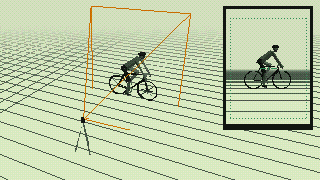
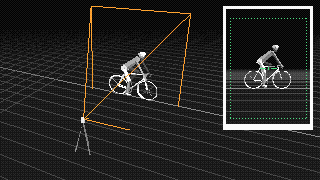
| Check | Aim for | Why |
|---|---|---|
| On the bike | In the saddle, feet on the pedals, hands on the bars, as you usually ride | We measure the position you actually ride in |
| Pedal | Photo: near pedal at 6:00. Video: just pedal, we use the frames at the bottom of the stroke | The knee angle is read with the pedal at the bottom |
| Side-on | Phone square to the bike, within 30° | Turned away, the legs and frame look shorter and the angles read wrong |
| Frame | Phone upright, about 3 m / 10 ft away, whole bike and rider inside the frame | The wheels give the scale, and a cropped head or foot can't be measured |
| Tilt | Phone at about saddle height, tilted no more than 7° | A tilted phone shifts the torso angle by the same amount |
Light and focus
Shoot in even light with no bright window behind you, and keep the phone still: dark or blurry photos get sent back for a retake.
Use the live camera: it shows hints on screen while you set up the shot.
You can upload a seated photo, up to 20 photos from different points in your pedal stroke, or a 10–30 second video.
How the position check works
Take a side-on photo or video of yourself on the bike, with the whole bike in the frame.
What stays on your device: your photo or video. Pose detection runs in your browser: it finds your joints on the image, and the image itself is never uploaded.
What is sent to our server: only numbers. These are:
- the positions of the detected joints in the image (x/y coordinates);
- the image size;
- the level line and wheel markers;
- your chosen discipline and wheel size.
The server turns these points into angles and sends back the result. Nothing is stored. The detection model itself is downloaded from Google’s and jsDelivr’s servers; nothing is sent to them.
The check measures your torso, knee, shoulder and elbow angles and compares them with target ranges for your discipline. The knee target depends on how you captured your position:
- One photo with the pedal held at the bottom (static): knee flexion 25–35°, shown as an angle of 145–155°. This is the range widely cited from Holmes, Pruitt & Whalen (1994). We have not been able to verify it against the original paper.
- A video, or several photos across the pedal stroke (dynamic): knee flexion 30–40°, shown as 140–150°. This comes from Ferrer-Roca et al. (2012), who measured riders on video while they pedaled.
If a wheel is visible, the advice is also converted to millimeters, for example “raise the saddle about 5 mm”. To try a change before making it on the bike, move the saddle, stem or spacers in the fit constructor.
Related guides: How to check your position at home · Knee angle in bike fitting · TT and triathlon bike fit
Frequently asked questions
Photo or video: which is better?
Video, if you can. The frame at the bottom of the pedal stroke is picked automatically and your angles are measured while you pedal, which is how the dynamic knee range was defined. A single photo works if you hold the pedal still at the bottom of the stroke.
How should I set up the camera?
Exactly side-on to the bike, level, at roughly hip height, a few steps back, with the whole bike and both wheels in the frame. Wear fitted clothing so your hip, knee, ankle, shoulder and elbow are visible.
How accurate is it?
It’s a 2D estimate from a single camera, so it has limits:
- if the camera isn’t exactly side-on, angles are distorted;
- the joint positions are estimated by a pose model, not marked on your body, and loose clothing or a hidden joint makes the estimate worse;
- only the side facing the camera is measured;
- in video, the chosen frame can sit slightly off the exact bottom of the stroke, which reads as a little more knee bend.
Because of all this, a reading can be off by a few degrees. Use it to spot clear problems and track changes, not to chase single degrees. It doesn’t replace a professional bike fit.
Why does my knee target change between photo and video?
The two ranges come from studies that measured the knee in different ways: a static measurement with the pedal held at the bottom, and a dynamic one while pedaling. Each range applies only to its own method, so the check picks the one that matches how you captured your position.